
Prototyping software is one of the most important tools in a UX Designer’s toolbox, and Figma is currently the creme de la creme (AKA industry standard) of those tools. I have been working with Figma for over three years now, making the switch from Adobe XD (two years)
The power of Figma to create a prototype that walks and talks like a live experience is incredible. And the more features you know about as a designer, the more lifelike that experience can be.
I was recently tasked with creating an interactive mockup that illustrated the experience of customizing a proof of delivery (POD) document. This consisted of a page of toggle switches and a preview of an example POD. In this mockup, I wanted any items toggled on or off on the settings page to be reflected in the preview.
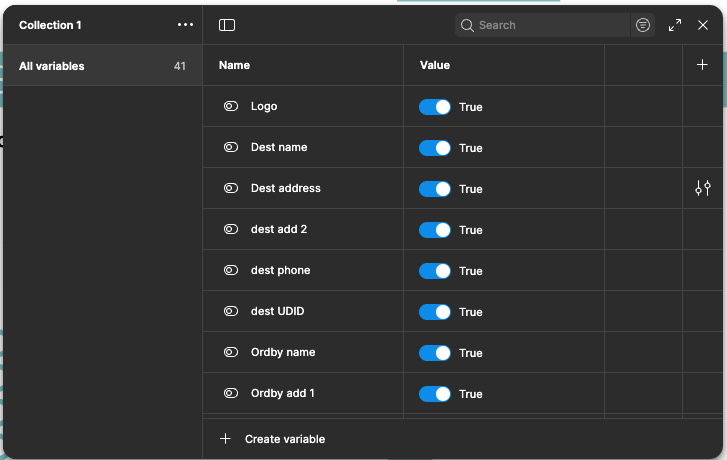
To accomplish this, I created Boolean variables for each of the forty (40) fields.
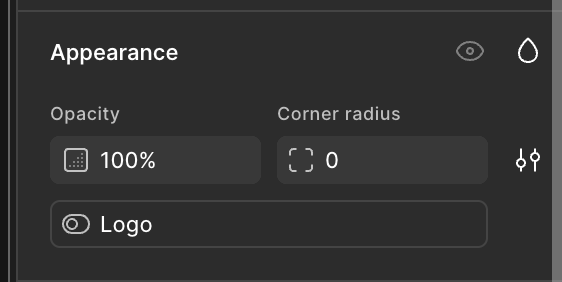
Then I applied the variables to each of the text frames correlating to that setting, using the Appearance panel.
Now comes the tricky part. I had to figure out how to have each of those Boolean items react to the toggle switches that I set up and have the switch indicate the correct status. For this, I used the conditional action available in the prototyping settings.
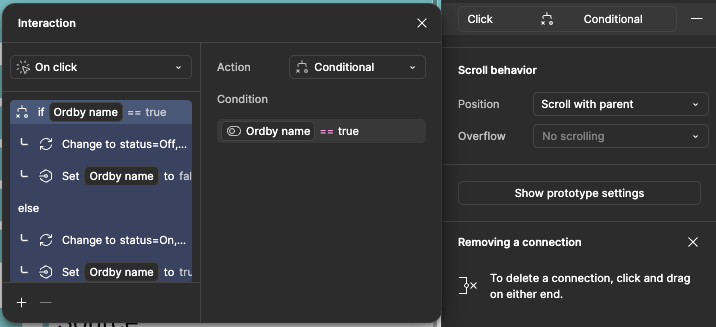
This logic checks the status of the correct variable and then sets the variable based on its current status. Therefore, by toggling a switch on the settings page, the corresponding variable will be shown or hidden in the preview.
This mockup looks simple, but the amount of time and logic that hides beneath its glossy finish is not to be underrated. It’s these kinds of finishing touches that really help the UX Designer show their vision to the reviewers and developers.
You can see the results of this project at the link below. You can toggle any setting except the logo. Click the “POD preview” box to see the updated variables. Please note that some of the design elements have been simplified to protect proprietary information.
The mockup is password-protected.
Password: UXwithMeg

